Category: Uncategorized

  • Describe external identities

    Today’s world is about collaboration, working with people both inside and outside of your organization. That means you’ll sometimes need to provide access to your organization’s applications or data to external users.

    Microsoft Entra External ID combines powerful solutions for working with people outside of your organization. With External ID capabilities, you can allow external identities to securely access your apps and resources. Whether you’re working with external partners, consumers, or business customers, users can bring their own identities. These identities can range from corporate or government-issued accounts to social identity providers like Google or Facebook.
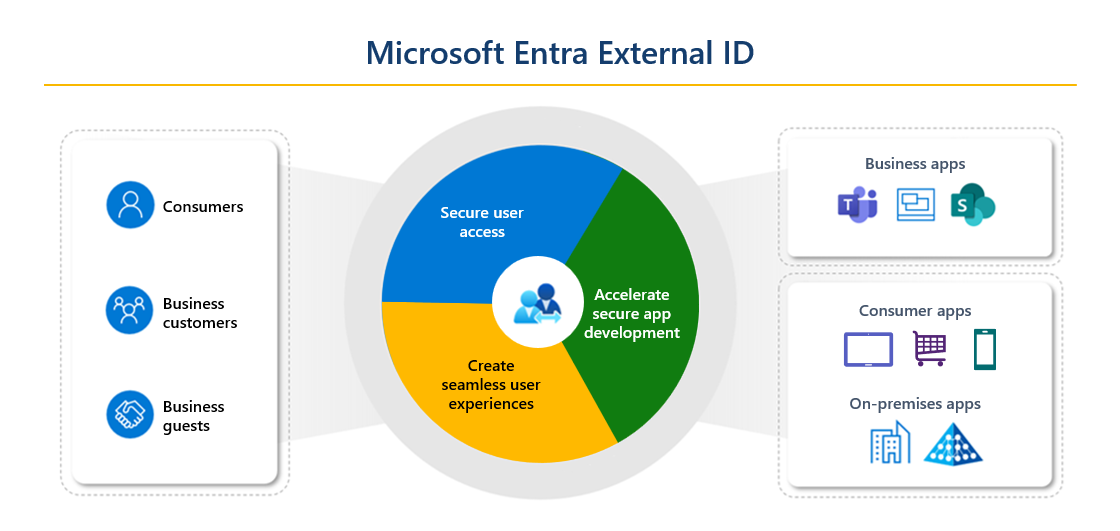
    Diagram showing elements of Microsoft External ID. On the left, it shows Consumers business customers, and guests. On the right, it shows business apps, consumer apps, and on-premises apps. In the center, is a circle showing secure user access, seamless experience, and secure app development.

    Microsoft Entra External ID addresses the scenarios that are encountered when it comes to working with external users.

    • Collaborate with business guests
    • Secure your apps for consumers and business customers

    Also, each of these scenarios suggests a different approach for how an organization configures their Microsoft Entra ID tenant.
    nodejs training courses malaysia

  • Describe hybrid identity

    While there’s no denying the rapid pace at which organizations are moving their workloads to the cloud, many businesses, and corporations are still a mixture of on-premises and cloud applications. Regardless of where an application is hosted, users expect and require easy access. As such, there’s need to have a single identity across these various applications.

    Microsoft’s identity solutions span on-premises and cloud-based capabilities. These solutions create a common identity for authentication and authorization to all resources, regardless of location. We call this hybrid identity.

    Hybrid identity is accomplished through provisioning and synchronization.

    • Inter-directory provisioning is provisioning an identity between two different directory services systems. For a hybrid environment, the most common scenario for inter-directory provisioning is when a user already in Active Directory is provisioned into Microsoft Entra ID.
    • Synchronization is responsible for making sure identity information for your on-premises users and groups is matching the cloud.

    lpi linux administration certification training courses malaysia

  • Describe types of identities

    In Microsoft Entra ID, there are different types of identities that are supported. The terms you’ll hear and are introduced in this unit are user identities, workload identities, device identities, external identities, and hybrid identities. Each of these terms is described in more detail in the sections that follow.

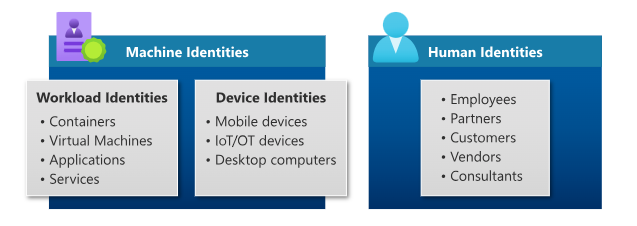
    When you ask the question, to what can I assign an identity in Microsoft Entra ID, there are three categories.

    • You can assign identities to people (humans). Examples of identities assigned to people are employees of an organization that are typically configured as internal users, and external users that include customers, consultants, vendors, and partners. For our purposes, we’ll refer to these as user identities.
    • You can assign identities to physical devices, such as mobile phones, desktop computers, and IoT devices.
    • Lastly, you can assign identities to software-based objects, such as applications, virtual machines, services, and containers. These identities are referred to as workload identities.
    A block diagram showing the categories of identity types. The categories consist of Workload identities, device identities, and human identities. Workload and device identities are grouped under machine identities.

    In this unit, we consider each type of Microsoft Entra identity.

    User

    User identities represent people such as employees and external users (customers, consultants, vendors, and partners). In Microsoft Entra ID, user identities are characterized by how they authenticate and the user type property.

    How the user authenticates is asked relative to the host organization’s Microsoft Entra tenant and can be internal or external. Internal authentication means the user has an account on the host organization’s Microsoft Entra ID and uses that account to authenticate to Microsoft Entra ID. 

    veeam certification malaysia

  • Describe Microsoft Entra Verified ID

    Microsoft Entra Verified ID is a managed verifiable credentials service based on open standards. Verified ID automates verification of identity credentials and enables privacy-protected interactions between organizations and users.

    Why do we need it?

    In the digital world, transactions are increasingly done over the web and often require individuals to make claims or assertions that organizations can digitally verify. The current process of obtaining and presenting a digital credential that can make a verifiable claim can be difficult and cumbersome. In addition, a digital credential serves as a digital identity. Once you use that online digital identity to access the desired service or make an online transaction, it’s common you begin to get targeted advertisements and emails for services for which you never signed up. That’s because it’s hard to retain control of your identity once you’ve shared it in exchange for access to a service.

    Individuals and businesses need a way to express their qualifications and/or personal information, that is, our digital identities, over the web in a manner that is cryptographically secure, compliant to privacy requirements, and machine readable for verification. Additionally, individuals and organizations want to be able to control how and when their digital identities are used and shared. Verifiable credentials help address these challenges.

  • Describe the capabilities of Privileged identity Management

    Privileged Identity Management (PIM) is a service of Microsoft Entra ID that enables you to manage, control, and monitor access to important resources in your organization. These include resources in Microsoft Entra, Azure, and other Microsoft online services such as Microsoft 365 or Microsoft Intune. PIM mitigates the risks of excessive, unnecessary, or misused access permissions. It requires justification to understand why users want permissions, and enforces multifactor authentication to activate any role.

    PIM is:

    • Just in time, providing privileged access only when needed, and not before.
    • Time-bound, by assigning start and end dates that indicate when a user can access resources.
    • Approval-based, requiring specific approval to activate privileges.
    • Visible, sending notifications when privileged roles are activated.
    • Auditable, allowing a full access history to be downloaded.

    Why use PIM?

    PIM reduces the chance of a malicious actor getting access by minimizing the number of people who have access to secure information or resources. By time-limiting authorized users, it reduces the risk of an authorized user inadvertently affecting sensitive resources. PIM also provides oversight for what users are doing with their administrator privileges.

  • Describe entitlement management

    Entitlement management is an identity governance feature that enables organizations to manage the identity and access lifecycle at scale. Entitlement management automates access request workflows, access assignments, reviews, and expiration.

    • Users may not know what access they should have, and even if they do, they might have difficulty locating the right individuals to approve it.
    • When users find and receive access to a resource, they may hold on to access longer than is required for business purposes.
    • Managing access for external users.

    Entitlement management includes the following capabilities to address these challenges:

    • Delegate the creation of access packages to non-administrators. These access packages contain resources that users can request. The delegated access package managers then define policies that include rules such as which users can request access, who must approve their access, and when access expires.
    • Managing external users. When a user who isn’t yet in your directory requests access, and is approved, they’re automatically invited into your directory and assigned access. When their access expires, if they have no other access package assignments, their B2B account in your directory can be automatically removed.
  • Manage user and guest user access with access reviews

    With access reviews, you can easily ensure that users or guests have appropriate access. You can ask the users themselves or a decision maker to participate in an access review and recertify (or attest) to users’ access. The reviewers can give their input on each user’s need for continued access based on suggestions from Microsoft Entra ID. When an access review is finished, you can then make changes and remove access from users who no longer need it.

    Admins who create access reviews can track progress as the reviewers complete their process. No access rights are changed until the review is finished. You can, however, stop a review before it reaches its scheduled end.

    When the review is complete, it can be set to manually or autoapply changes to remove access from a group membership or application assignment, except for a dynamic group or a group that originates on-premises. In those cases, the changes must be applied directly to the group

  • Describe access reviews

    Microsoft Entra access reviews enable organizations to efficiently manage group memberships, access to enterprise applications, and role assignment. Regular access reviews ensure that only the right people have access to resources. Excessive access rights are a known security risk. However, when people move between teams, or take on or relinquish responsibilities, access rights can be difficult to control.

    Microsoft Entra ID enables you to collaborate with users from inside your organization and with external users. Users can join groups, invite guests, connect to cloud apps, and work remotely from their work or personal devices. This convenience has led to a need for better access management capabilities.

    There are many use cases in which access reviews should be used. Here are just a few examples.

    • Too many users in privileged roles: It’s a good idea to check how many users have administrative access and if there are any invited guests or partners that haven’t been removed after being assigned to do an administrative task. You can recertify the role assignment of users in Microsoft Entra roles or Azure resources roles in the Microsoft Entra Privileged Identity Management (PIM) experience.
    • Business critical data access: For certain resources, such as business critical applications, it might be required as part of compliance processes to ask people to regularly reconfirm and give a justification on why they need continued access.
    • To maintain a policy’s exception list: Sometimes there are business cases that require you to make exceptions to policies. As the IT admin, you can manage this task and provide auditors with proof that these exceptions are reviewed regularly.
    • Ask group owners to confirm they still need guests in their groups: If a group gives guests access to business sensitive content, then it’s the group owner’s responsibility to confirm the guests still have a legitimate business need for access.
    • Have reviews recur periodically: You can set up recurring access reviews of users at set frequencies such as weekly, monthly, quarterly or annually. Reviewers are notified at the start of each review and upon completion approve or deny access through a friendly user interface and with the help of smart recommendations.
  • Describe Microsoft Entra ID Governance

    Microsoft Entra ID Governance allows you to balance your organization’s need for security and employee productivity with the right processes and visibility. As employees’ roles change within an organization, you can use Microsoft Entra ID Governance to automatically ensure that the right people have the right access to the right resources, with identity and access process automation, delegation to business groups, and increased visibility.

    ID Governance gives organizations the ability to do the following tasks:

    • Govern the identity lifecycle.
    • Govern access lifecycle.
    • Secure privileged access for administration.

    These actions can be completed for employees, business partners and vendors, and across services and applications, both on-premises and in the cloud.

    It’s intended to help organizations address these four key questions:

    • Which users should have access to which resources?
    • What are those users doing with that access?
    • Are there effective organizational controls for managing access?
    • Can auditors verify that the controls are working?
  • Access the portal

    You access the Microsoft Defender for Endpoint through a web portal using an internet browser. From there, you can monitor device activities, investigate and remediate alerts, perform hunting activities, configure global settings, and more.

    Now that you’ve learned about the capabilities and components of Microsoft Defender for Endpoint, you want to know whether you can access it in a familiar way. You need to ensure that your administration and security teams can configure settings and investigate problems from wherever they are.

    Here, you’ll learn about the Microsoft Defender portal.