Category: Uncategorized

  • Server-side request forgery

    Server-side request forgery (SSRF) describes situations where a web application is fetching a remote resource without validating the user-supplied URL. It allows an attacker to coerce the application to send a crafted request to an unexpected destination.

    Attackers might also use this functionality to import untrusted data into code that expects to only read data from trusted sources, allowing them to circumvent input validation.

    A URL or query string seen in a web browser’s address bar, when used as an input parameter, could be a perfect example of user input needing sanitization.

    During code review, you came across a seemingly harmless REST web GET request:

    C#Copy

    string url = Request.Form["url"];
    var client = new HttpClient();
    HttpResponseMessage response = await client.GetAsync(url);
    

    Without validating the supplied URL, an attacker can hijack the network connection and control the request schema by supplying ldap://, jar:// or file:// instead of https://. Furthermore, the POST method allows an attacker to force the application to send a crafted request to an unexpected destination.

    iot internet of things training courses malaysia
  • Security logging and monitoring

    How do you detect if you’re breached? How can you determine what steps the attacker took to penetrate your system?

    Without sufficient logging and monitoring, you can’t detect breaches. Logging and monitoring give you an opportunity to stop an attacker in their tracks. Telemetry, logging, and monitoring enables digital forensics and post-mortem after a breach. Logging and monitoring are essential components in ensuring that you can detect any suspicious activity in close to real time, or diagnosed after the fact.

    More importantly, collecting this data is useless without actively reviewing it or having alerting rules in place.

    Make sure to sanitize the data to prevent from over-logging or storing sensitive information as logs.

    Establish effective monitoring and alerting mechanisms. Ensure that sign in and access-control failures are logged with sufficient user context for identifying suspicious or malicious accounts. Take advantage of different logging levels (Info, Warning, Error, and so on) and log destinations. Avoid server-side error details from ever reaching client side, which can result in leaking your system’s implementation details.

    isaca certification training courses malaysia
  • Security misconfiguration

    Highly configurable and distributed software, along with supporting services and tooling, introduces complexity. Increased complexity also increases the attack surface by introducing more components that should be secured. Security misconfigurations can occur when an application is missing the appropriate security hardening across any part of the application stack. It can manifest itself by reusing passwords or improperly configuring permissions on cloud services.

    Security hardening

    The application might be vulnerable if it’s missing a rigorous, repeatable application security configuration process.

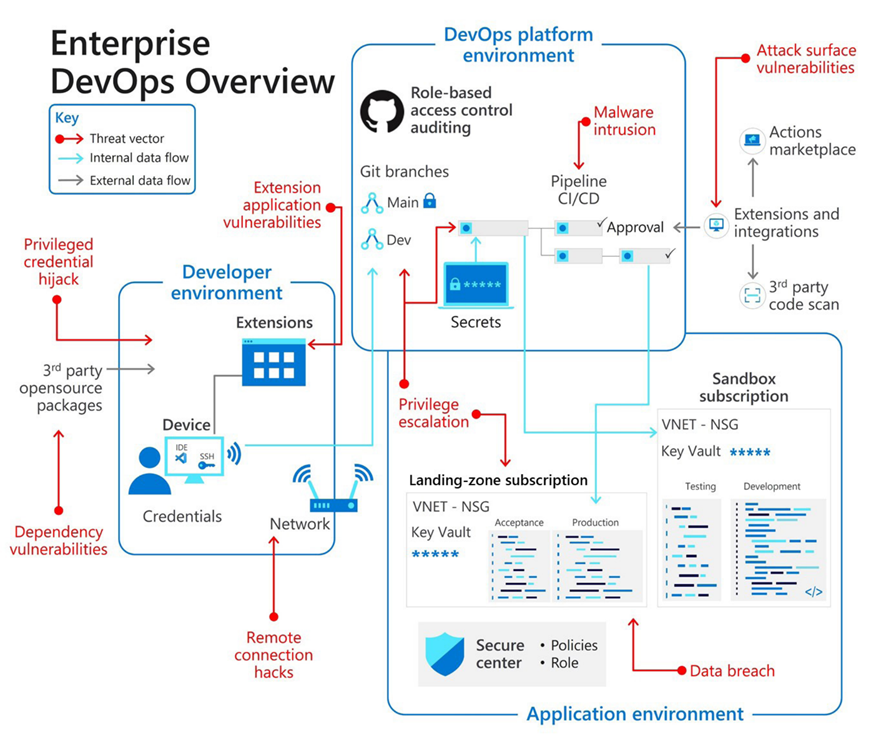
    The following image shows a typical enterprise-scale application with supporting DevOps process. Here, security misconfiguration can apply to how you protect developer workstations, handle app secrets in your application, protect the CI/CD process, and so on.

    Diagram showing angles of attack in complex system.

    Security misconfiguration can manifest itself in many places, from web.config or appsettings.json settings, a database account, connectivity, or Internet Information Services (IIS) configurations. The automation workflows and cloud hosting can be misconfigured or abused too. A CI/CD system could be storing plain-text environment credentials for release. A cloud environment could be using managed shared admin accounts instead of following the least-privileged principle. In the world of Microsoft cloud, Azure role-based access control offers granular control over permissions granted to users and cloud services.

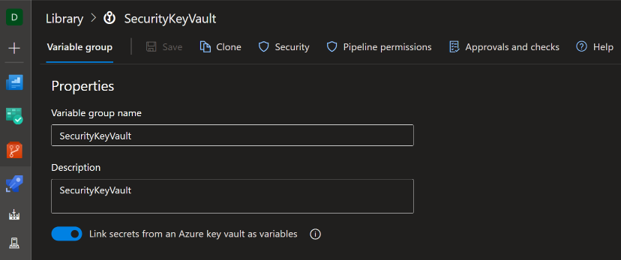
    Screenshot showing Azure DevOps Library linked with Azure KeyVault.

    The preceding example demonstrates one of many native integrations between Azure DevOps and Azure Cloud, where Azure DevOps Library is linked with Azure KeyVault to securely access secret pipeline parameters.

    Secret values should never be found in a codebase. The same practice applies to infrastructure as code (IaC) release workflows and CI/CD services themselves.

    As the new addition to the team, be on the lookout for default accounts and their passwords being enabled and unchanged. Use secure settings for your application servers, frameworks, libraries, and databases. As you familiarize yourself with your team’s codebase, take this opportunity to remove any unused features, components, accounts, or services from your applications.

    iso iec 20000 certification training courses malaysia
  • Insecure design

    So far, you focused on unwanted coding errors leading to security flaws; that is, implementation issues surrounding user authenticating, data encryption, and so on. Insecure design is different from insecure implementation. Insecure design has more to do with risks related to design and architectural flaws. A secure implementation might have an insecure design, which still renders an application vulnerable to attacks and exploits.

    Exercise assume breach mentality: minimize the blast radius for breaches and prevent lateral movement by segmenting access by network, user, devices, and application awareness. Verify all sessions are encrypted end-to-end. Use analytics to get visibility, drive threat detection, and improve defenses. Authenticate and authorize based on all available data points. User identity, location, device health, service, or workload are some common data points.

    You might be familiar with the term shift left. Most often, the term refers to testing your application early on during the application lifecycle to ensure high quality. Shift left also applies to considering security before you write a single line of code. A few activities to employ early on in the design process could include reviewing secure design patterns and principles, using reference architectures, and performing threat modeling.

    Let’s discuss the latter in more detail. Threat modeling is an essential part of DevSecOps, because it informs your security design process and helps find vulnerabilities in your application. While it does fall under DevSecOps, it also sits neatly under education too.

    You can use threat modeling to help mitigate threats from the early stages of application design.

    istqb software testing certification training courses malaysia
  • Injection

    The injection category describes instances when an application accepts data as input and processes it as instruction instead of as data.

    Let’s consider how your team’s application handles input data.

    .NET provides built-in capabilities for data annotation and validation. The attributes from the System.ComponentModel.DataAnnotations namespace can decode your data model to provide the necessary validation functionality. Email, phone, credit card, or date validators are only a few examples of the built-in validators that can spare you the effort of writing and maintaining custom code.

    C#

    Copy
    using System.ComponentModel.DataAnnotations;

    public class ExampleModel
    {
    [Required]
    [StringLength(10, ErrorMessage = “Name is too long.”)]
    public string? Name { get; set; }

    [Required]
    [Range(typeof(bool), "true", "true", ErrorMessage = "Unapproved design.")] 
    public bool IsValidatedDesign { get; set; }

    }
    SQL injection
    Injection attacks can take many forms; for example, SQL or command injection.

    The following statement is a simple example of SQL injection, where username in an unsanitized query input parameter:

    SQL

    Copy
    string sql = “SELECT * FROM users WHERE name = ‘” + username + “‘;”;
    In absence of user input validation, a malicious actor could supplement a genuine user name for a crafted part of a SQL statement a’;DROP TABLE users;– resulting in a change of query intentions:

    SQL

    Copy
    SELECT * FROM Users WHERE name = ‘a’;DROP TABLE users;–
    As a result, the table containing user information is removed from the database. In a similar way, you can craft statements to extract data before data table deletion.

    File input validation
    In client-server scenarios, make sure the input is validated on both the client and the server side. Additionally, if validation passes on the server, process the form and send a success status code (200 – OK). However, if validation fails, return a failure status code (400 – Bad Request) and the field validation errors. Validation details from the server might give the malicious actor more insights on how your app logic works if they’re displayed on the client side.

    Input validation also includes the way you handle file uploads. Consider an ASP.NET Blazor component handling user file uploads. The component checks for correctness before uploading the file to Azure Blob Storage. It includes extension and maximum file size inspection, and overrides the supplied filename with a random name.

    C#

    Copy

    @code {

    private string[] permittedExtensions = { ".txt", ".pdf" };
    private long maxFileSize = 1024 * 15;
    
    private async void LoadFile(InputFileChangeEventArgs e)
    {
        if (e.File != null)
        {    
            if (e.File.Size == 0 || e.File.Size > maxFileSize)
            {
                // log error
            }            
            else 
            {
                var ext = Path.GetExtension(e.File.Name).ToLowerInvariant();
    
                if (string.IsNullOrEmpty(ext) || !permittedExtensions.Contains(ext))
                {
                    var trustedFileNameForFileStorage = Path.GetRandomFileName();
    
                    await new BlobContainerClient("connection", "blob").UploadBlobAsync(trustedFileNameForFileStorage, e.File.OpenReadStream());                    
                }
            }
        }
    }

    }

    itil certification training courses malaysia
  • Encryption

    To securely encrypt a value like a string or integer, you can use symmetric or asymmetric encryption. To encrypt data with a symmetric-key algorithm, you can use the Advanced Encryption Standard (AES). In the next example, we create a new instance of the Aes class and use it to generate a new key and initialization vector (IV). We use the AES to encrypt any type of managed stream. The stream is then wrapped with CryptoStream.

    C#

    Copy
    Aes aes = Aes.Create();
    CryptoStream cryptStream = new CryptoStream(fileStream,
    aes.CreateEncryptor(aes.Key, aes.VI),
    CryptoStreamMode. Write);
    Hashing
    Hashing is a one-way operation. When you’re using a hashing function to hash nonunique inputs such as passwords, use a salt value added to the original value before hashing.

    C#

    Copy
    public static byte[] HashPassword256(string password)
    {
    System.Security.Cryptography.SHA256 mySHA256 = System.Security.Cryptography.SHA256.Create();
    var encoding = new System.Text.UnicodeEncoding();
    return mySHA256.ComputeHash(encoding.GetBytes(password));
    }
    Random numbers
    Temporary password or access codes are intended to be unique per user. You can achieve this uniqueness by introducing random-character generation, and it’s worth noting how the randomness is achieved. You might be familiar with the System.Random class. System.Random is a deterministic pseudo-random sequence generator. It’s predictable and seeded only from the system clock, which means it’s guessable. As a matter of fact, Microsoft Learn documentation explicitly states that you shouldn’t use it for generating passwords. To generate a cryptographically secure random number that’s suitable for creating a random password, you should use a RandomNumberGenerator instance.

    C#

    Copy
    var randomNumberGenerator = System.Security.Cryptography.RandomNumberGenerator.Create();
    By using RandomNumberGenerator, you can eliminate the chances of two or more users ending up with the same token or password when they must be unique.

    java ee enterprise edition training courses malaysia
  • Broken access control

    Recall that you recently joined a team at an IT software company who tasked you with conducting a design and code review of the team-owned codebases. As you onboard to your new team and explore the codebase, you discover an ASP.NET Blazor web project. With OWASP Top 10 in mind, you set off on a deep dive into the code with your security lenses on.

    You start at the top of the OWASP Top 10 list with #1: Broken Access Control. This category refers to incidents where a user who shouldn’t have permission to access that data viewed confidential information.

    Built-in framework security capabilities
    .NET has built-in authentication and session management, so there’s no need to implement your own. Let’s consider a ASP.NET Core controller. A controller without any authorization attributes treats each request the same way without applying any security checks. By decorating controller actions or the controller itself with Authorize (user must be signed in and authenticated) or AllowAnonymous (any unauthenticated caller can invoke method) attributes, you gain control over what’s publicly accessible and which functionality is for authorized users only.

    Plain ASP.NET controller with no authorization attributes, no access restrictions applied.

    C#

    Copy
    public class AccountController : Controller
    {
    public ActionResult Login()
    {
    }

    public ActionResult Logout()
    {
    }

    public ActionResult GetCitizenTaxId()
    {
    }
    }
    Controller with authorization attributes, based on policy or role assignments. Authorized caller is able to invoke the GetCitizenTaxId method.

    C#

    Copy
    [Authorize(Policy=””, Roles=””]
    public class AccountController : Controller
    {
    [AllowAnonymous]
    public ActionResult Login()
    {
    }

    public ActionResult Logout()
    {
    }

    [Authorize]
    public ActionResult GetCitizenTaxId()
    {
    }
    }
    Similarly, the ASP.NET Minimal API supports the attribute decoration (Lambda HTTP get method with [Authorize] attribute), policy (AdminsOnly), and claim (admin) authorization, as shown here:

    C#

    Copy
    var builder = WebApplication.CreateBuilder(args);

    // Policy and claim use below
    builder.Services.AddAuthorization(o => o.AddPolicy(“AdminsOnly”, b => b.RequireClaim(“admin”, “true”)));
    var connectionString = builder.Configuration.GetConnectionString(“DefaultConnection”);
    builder.Services.AddDbContext(options => options.UseSqlServer(connectionString));
    builder.Services.AddDefaultIdentity(options => options.SignIn.RequireConfirmedAccount = true).AddEntityFrameworkStores();
    var app = builder.Build();
    app.UseAuthorization();

    // Attribute use below
    app.MapGet(“/auth”, [Authorize] () => “This endpoint requires authorization.”);
    app.MapGet(“/”, () => “This endpoint doesn’t require authorization.”);
    app.Run();
    Your application’s user interface should also reflect the user’s authentication (the user is who they say they are) and authorization state (whether the user is allowed to access certain information). Here, too, you’re covered by the OWASP Top 10 framework. ASP.NET Blazor’s razor syntax supports conditionally displayed components depending on authorization status. The AutorizeView component selectively displays UI content based on user’s authorized status.

    C#

    Copy

    Hello, @context.User.Identity.Name!

    You can only see this content if you are authorized. Authorized Only Button

    Authentication Failure!

    You are not signed in.

    @code {

    private void SecureMethod() 
    { 
        // Invoked only upon successful authorization
    }     

    }

    dynamics 365 marketing training courses malaysia
  • What is OWASP Top 10?

    As application complexity increases, so does the effort of making it secure. Modern applications, in contrast with single-project monolith legacy applications, have many dependencies. Including, external libraries, services for hosting, building, and releasing, to name a few. None of these services are simple “plug and play” affairs. Developers need to understand them and know how to configure and implement the flows and processes securely in their own code.

    Security is everyone’s job. Developers, service engineers, and program and product managers must understand security basics and know how to build security into software and services.

    Training and education is an essential stage in the security-application development lifecycle (or SDL). For developers, OWASP Top 10 is a great start.

    From a software-development point of view, your team’s security journey should begin by familiarizing yourself with the concepts behind each item on the Top 10 list.

    Picture of the OWASP logo.

    Although security is everyone’s job, it’s important to remember that not everyone needs to be a security expert nor strive to become a proficient penetration tester. However, ensuring everyone understands the attacker’s perspective, their goals, and the art of the possible, helps capture the attention of everyone and raise the collective knowledge bar.

    java programming training courses malaysia

  • Build reusable Blazor components using layouts

    Blazor includes layouts to make it easy to code common user interface (UI) elements that appear on many pages in your app.

    Suppose you’re working in the pizza delivery company’s website and you created the content for most of the main pages as a set of Blazor components. You want to ensure that these pages have the same branding, navigation menus, and footer section. However, you don’t want to have to copy and paste that code into multiple files.

    oracle java training courses malaysia
  • Obtaining location information and navigating with NavigationManager

    Suppose you write a component to handle a URI that the user requests, such as http://www.contoso.com/pizzas/margherita/?extratopping=pineapple.

    When you write a component, you might need access to navigation information like:

    • The current full URI, such as http://www.contoso.com/pizzas/margherita?extratopping=pineapple.
    • The base URI, such as http://www.contoso.com/.
    • The base relative path, such as pizzas/margherita.
    • The query string, such as ?extratopping=pineapple.

    You can use a NavigationManager object to obtain all these values. You must inject the object into the component and then you can access its properties. This code uses the NavigationManager object to obtain the website’s base URI and then uses it to set a link to the home page:

    razorCopy

    @page "/pizzas"
    @inject NavigationManager NavManager
    
    <h1>Buy a Pizza</h1>
    
    <p>I want to order a: @PizzaName</p>
    
    <a href=@HomePageURI>Home Page</a>
    
    @code {
        [Parameter]
        public string PizzaName { get; set; }
        
        public string HomePageURI { get; set; }
        
        protected override void OnInitialized()
        {
            HomePageURI = NavManager.BaseUri;
        }
    }
    

    To access the query string, you must parse the full URI. To execute this parse, use the QueryHelpers class from the Microsoft.AspNetCore.WebUtilities assembly:

    razorCopy

    @page "/pizzas"
    @using Microsoft.AspNetCore.WebUtilities
    @inject NavigationManager NavManager
    
    <h1>Buy a Pizza</h1>
    
    <p>I want to order a: @PizzaName</p>
    
    <p>I want to add this topping: @ToppingName</p>
    
    @code {
        [Parameter]
        public string PizzaName { get; set; }
        
        private string ToppingName { get; set; }
        
        protected override void OnInitialized()
        {
            var uri = NavManager.ToAbsoluteUri(NavManager.Uri);
            if (QueryHelpers.ParseQuery(uri.Query).TryGetValue("extratopping", out var extraTopping))
            {
                ToppingName = System.Convert.ToString(extraTopping);
            }
        }
    }
    

    With the preceding component deployed, if a user requested the URI http://www.contoso.com/pizzas?extratopping=Pineapple, they would see the message “I want to add this topping: Pineapple” in the rendered page.

    You can also use the NavigationManager object to send your users to another component in code by calling the NavigationManager.NavigateTo() method:

    razorCopy

    @page "/pizzas/{pizzaname}"
    @inject NavigationManager NavManager
    
    <h1>Buy a Pizza</h1>
    
    <p>I want to order a: @PizzaName</p>
    
    <button class="btn" @onclick="NavigateToPaymentPage">
        Buy this pizza!
    </button>
    
    @code {
        [Parameter]
        public string PizzaName { get; set; }
        
        private void NavigateToPaymentPage()
        {
            NavManager.NavigateTo("buypizza");
        }
    }
    jboss training courses malaysia