As an IT Admin for Contoso Corporation, you need alternatives to interact with Azure resources from the command line even when not using your default administrative device.
You can use Azure Cloud Shell to:
Open a secure command-line session from any browser-based device.
Interact with Azure resources without the need to install plug-ins or add-ons to your device.
Persist files between sessions for later use.
Use either Bash or PowerShell, whichever you prefer, to manage Azure resources.
Edit files (such as scripts) via the Cloud Shell editor.
As an IT admin for Contoso Corporation, you’re frequently on-call to perform administrative tasks and resolve workload disruptions to resources in your organization’s Azure subscriptions. When visiting a family member during a weekend that you’re on call, the development team notifies you of a problem with an Azure virtual machine (VM). The VM became nonresponsive during scheduled maintenance for the upgrade of an application that runs on it. Because the developers weren’t granted access to the underlying Azure virtual machine hosting infrastructure, they’re only able to remotely access the VM when it’s operating normally. So, you’re being called to diagnose and remediate the problem.
Since you’re visiting family, you don’t have access to your administrative workstation and diagnostic scripts. You do have access to a laptop with an internet browser. Using the laptop, you browse to the Azure portal, authenticate against your organization’s Azure subscription, open Azure Cloud Shell, mount an Azure File Share, access your diagnostic scripts, and diagnose and remediate the problems with the VM, returning it to operation.
Azure Cloud Shell is a command-line environment you can access through your web browser. You can use this environment to manage Azure resources, including VMs, storage, and networking. Just like you do when using the Azure CLI or Azure PowerShell.
Because Microsoft manages Cloud Shell, you always have access to the most recent versions of the Azure CLI and PowerShell modules right from any browser. You don’t have to worry about keeping modules up to date. With Cloud Shell, you just open your browser and sign in. Just like that, you have access to a command-line environment fully connected with your account’s permissions and the resources to which you have access. All that works in an infrastructure that’s compliant with double encryption at rest by default. You don’t need to take any further action!
After you’ve trained an object detection model, you can use the Azure AI Custom Vision SDK to develop a client application that submits new images to be analyzed.
C#Copy
using System;
using System.IO;
using Microsoft.Azure.CognitiveServices.Vision.CustomVision.Prediction;

// Authenticate a client for the prediction API
CustomVisionPredictionClient prediction_client = new CustomVisionPredictionClient(new ApiKeyServiceClientCredentials("<YOUR_PREDICTION_RESOURCE_KEY>"))
{
    Endpoint = "<YOUR_PREDICTION_RESOURCE_ENDPOINT>"
};

// Get classification predictions for an image
MemoryStream image_data = new MemoryStream(File.ReadAllBytes("<PATH_TO_IMAGE_FILE>"));
var result = prediction_client.DetectImage("<YOUR_PROJECT_ID>",
                                             "<YOUR_PUBLISHED_MODEL_NAME>",
                                             image_data);

// Process predictions
foreach (var prediction in result.Predictions)
{
    if (prediction.Probability > 0.5)
    {
        var left = prediction.BoundingBox.Left;
        var top = prediction.BoundingBox.Top;
        var height = prediction.BoundingBox.Height;
        var width =  prediction.BoundingBox.Width;
        Console.WriteLine($"{prediction.TagName} ({prediction.Probability})");
        Console.WriteLine($"  Left:{left}, Top:{top}, Height:{height}, Width:{width}");
    }
}
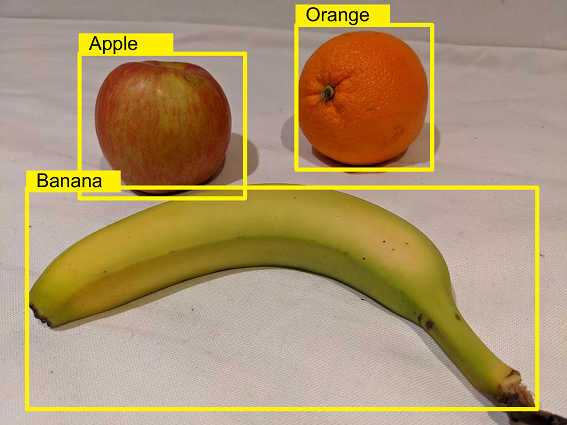
Object detection is a form of computer vision in which a model is trained to detect the presence and location of one or more classes of object in an image.
There are two components to an object detection prediction:
The class label of each object detected in the image. For example, you might ascertain that an image contains an apple, an orange, and a banana.
The location of each object within the image, indicated as coordinates of a bounding box that encloses the object.
To train an object detection model, you can use the Azure AI Custom Vision portal to upload and label images before training, evaluating, testing, and publishing the model; or you can use the REST API or a language-specific SDK to write code that performs the training tasks.
Image labeling
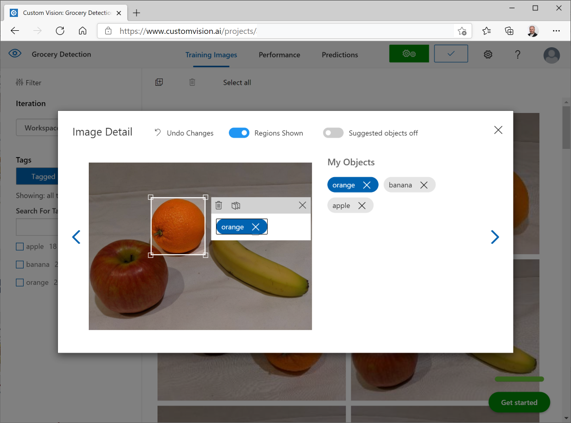
You can use Azure AI Custom Vision to create projects for image classification or object detection. The most significant difference between training an image classification model and training an object detection model is the labeling of the images with tags. While image classification requires one or more tags that apply to the whole image, object detection requires that each label consists of a tag and a region that defines the bounding box for each object in an image.
Labeling images in the Azure AI Custom Vision portal
The Azure AI Custom Vision portal provides a graphical interface that you can use to label your training images.
The easiest option for labeling images for object detection is to use the interactive interface in the Azure AI Custom Vision portal. This interface automatically suggests regions that contain objects, to which you can assign tags or adjust by dragging the bounding box to enclose the object you want to label.
Additionally, after tagging an initial batch of images, you can train the model. Subsequent labeling of new images can benefit from the smart labeler tool in the portal, which can suggest not only the regions, but the classes of object they contain.
To use the Custom Vision service to create an object detection solution, you need two Custom Vision resources in your Azure subscription:
An Azure AI Custom Vision training resource – used to train a custom model based on your own training images.
An Azure AI Custom Vision prediction resource – used to generate predictions from new images based on your trained model.
When you provision the Azure AI Custom Vision service in an Azure subscription, you can choose to create one or both of these resources. This separation of training and prediction provides flexibility. For example, you can use a training resource in one region to train your model using your own image data; and then deploy one or more prediction resources in other regions to support computer vision applications that need to use your model.
Each resource has its own unique endpoint and authentication keys; which are used by client applications to connect and authenticate to the service.
Microsoft Fabric’s Warehouse provides integrated data ingestion tools, enabling users to load and ingest data into warehouses on a large scale through either coding or noncoding experiences.
Data pipeline is the cloud-based service for data integration, which enables the creation of workflows for data movement and data transformation at scale. You can create and schedule data pipelines that can ingest and load data from disparate data stores. You can build complex ETL, or ELT processes that transform data visually with data flows.
Most of the functionality of data pipelines in Microsoft Fabric comes from Azure Data Factory, allowing for seamless integration and utilization of its features within the Microsoft Fabric ecosystem.
Each organization has their own guiding principles, but ultimately these principles need to be part of a larger responsible AI strategy to be effective. This strategy should encompass how your organization brings these principles to life both within your organization and beyond.
We recommend establishing a governance system that is tailored to your organization’s unique characteristics, culture, guiding principles, and level of engagement with AI. The tasks of the board should include designing responsible AI policies and measures; attending they’re being followed, and ensuring compliance.
To help your organization get started, we have provided an overview of three common governance approaches: hiring a Chief Ethics Officer, establishing an ethics office, and forming an ethics committee. The first approach is centralized, and the others are decentralized. All of them have their benefits, but we recommend combining them in a hybrid approach. A governance system that reports to the board of directors and has financial support, human resources, and authority is more likely to create real change across an organization.
To build trust, it’s critical that AI systems operate reliably, safely, and consistently under normal circumstances and in unexpected conditions. These systems should be able to operate as they were originally designed, respond safely to unanticipated conditions, and resist harmful manipulation. It’s also important to be able to verify that these systems are behaving as intended under actual operating conditions. How they behave and the variety of conditions they can handle reliably and safely largely reflects the range of situations and circumstances that developers anticipate during design and testing.
To ensure reliability and safety in your AI system, you should:
Develop processes for auditing AI systems to evaluate the quality and suitability of data and models, monitor ongoing performance, and verify that systems are behaving as intended based on established performance measures.
Provide detailed explanation of system operation including design specifications, information about training data, training failures that occurred and potential inadequacies with training data, and the inferences and significant predictions generated.
Design for unintended circumstances such as accidental system interactions, the introduction of malicious data, or cyberattacks.
Involve domain experts in the design and implementation processes, especially when using AI to help make consequential decisions about people.
Conduct rigorous testing during AI system development and deployment to ensure that systems can respond safely to unanticipated circumstances, don’t have unexpected performance failures, and don’t evolve in unexpected ways. AI systems involved in high-stakes scenarios that affect human safety or large populations should be tested both in lab and real-world scenarios.
Evaluate when and how an AI system should seek human input for impactful decisions or during critical situations. Consider how an AI system should transfer control to a human in a manner that is meaningful and intelligible. Design AI systems to ensure humans have the necessary level of input on highly impactful decisions.
Develop a robust feedback mechanism for users to report performance issues so that you can resolve them quickly.
Privacy and security
As AI becomes more prevalent, protecting privacy and securing important personal and business information is becoming more critical and complex. With AI, privacy and data security issues require especially close attention because access to data is essential for AI systems to make accurate and informed predictions and decisions about people.
To ensure privacy and security in your AI system, you should:
Comply with relevant data protection, privacy, and transparency laws by investing resources in developing compliance technologies and processes or working with a technology leader during the development of AI systems. Develop processes to continually check that the AI systems are satisfying all aspects of these laws.
Design AI systems to maintain the integrity of personal data so that they can only use personal data during the time it’s required and for the defined purposes that have been shared with customers. Delete inadvertently collected personal data or data that is no longer relevant to the defined purpose.
Protect AI systems from bad actors by designing AI systems in accordance with secure development and operations foundations, using role-based access, and protecting personal and confidential data that is transferred to third parties. Design AI systems to identify abnormal behaviors and to prevent manipulation and malicious attacks.
Design AI systems with appropriate controls for customers to make choices about how and why their data is collected and used.
Ensure your AI system maintains anonymity by taking into account how the system removes personal identification from data.
Conduct privacy and security reviews for all AI systems.
Research and implement industry best practices for tracking relevant information about customer data, accessing and using that data, and auditing access and use.
In the last unit, we discussed some of the societal implications of AI. We touched on the responsibility of businesses, governments, NGOs, and academic researchers to anticipate and mitigate unintended consequences of AI technology. As organizations consider these responsibilities, more are creating internal policies and practices to guide their AI efforts.
At Microsoft, we’ve recognized six principles that we believe should guide AI development and use: fairness, reliability and safety, privacy and security, inclusiveness, transparency, and accountability. For us, these principles are the cornerstone of a responsible and trustworthy approach to AI, especially as intelligent technology becomes more prevalent in the products and services we use every day.
Fairness
AI systems should treat everyone fairly and avoid affecting similarly situated groups of people in different ways. For example, when AI systems provide guidance on medical treatment, loan applications, or employment, they should make the same recommendations to everyone with similar symptoms, financial circumstances, or professional qualifications.
To ensure fairness in your AI system, you should:
Understand the scope, spirit, and potential uses of the AI system by asking questions such as, how is the system intended to work? Who is the system designed to work for? Will the system work for everyone equally? How can it harm others?
Attract a diverse pool of talent. Ensure the design team reflects the world in which we live by including team members that have different backgrounds, experiences, education, and perspectives.
Identify bias in datasets by evaluating where the data came from, understanding how it was organized, and testing to ensure it’s represented. Bias can be introduced at every stage in creation, from collection to modeling to operation. The Responsible AI Dashboard, available at the Resources section, includes a feature to help with this task.
Identify bias in machine learning algorithms by applying tools and techniques that improve the transparency and intelligibility of models. Users should actively identify and remove bias in machine learning algorithms.
Leverage human review and domain expertise. Train employees to understand the meaning and implications of AI results, especially when AI is used to inform consequential decisions about people. Decisions that use AI should always be paired with human review. Include relevant subject matter experts in the design process and in deployment decisions. An example would be including a consumer credit subject matter expert for a credit scoring AI system. You should use AI as a copilot, that is, an assisting tool that helps you do your job better and faster but requires some degree of supervising.
Research and employ best practices, analytical techniques, and tools from other institutions and enterprises to help detect, prevent, and address bias in AI systems.