Category: Uncategorized

  • Examples of AI agent use cases

    AI agents have a wide range of applications across various industries. Here are some notable examples:

    Personal productivity agents

    Personal productivity agents assist individuals with daily tasks such as scheduling meetings, sending emails, and managing to-do lists. For instance, Microsoft 365 Copilot can help users draft documents, create presentations, and analyze data within the Microsoft Office suite.

    Research agents

    Research agents continuously monitor market trends, gather data, and generate reports. These agents can be used in financial services to track stock performance, in healthcare to stay updated with the latest medical research, or in marketing to analyze consumer behavior.

    Sales agents

    Sales agents automate lead generation and qualification processes. They can research potential leads, send personalized follow-up messages, and even schedule sales calls. This automation helps sales teams focus on closing deals rather than administrative tasks.

    Customer service agents

    Customer service agents handle routine inquiries, provide information, and resolve common issues. They can be integrated into chatbots on websites or messaging platforms, offering instant support to customers. For example, Cineplex uses an AI agent to process refund requests, significantly reducing handling time and improving customer satisfaction.

    Developer agents

    Developer agents help in software development tasks such as code review, bug fixing, and repository management. They can automatically update codebases, suggest improvements, and ensure that coding standards are maintained. GitHub Copilot is a great example of a developer agent.

    dell emc training courses malaysia
  • What is an AI agent

    An AI agent is a software service that uses generative AI to understand and perform tasks on behalf of a user or another program. These agents use advanced AI models to understand context, make decisions, utilize grounding data, and take actions to achieve specific goals. Unlike traditional applications, AI agents can operate independently, executing complex workflows and automating processes without the need of constant human intervention. The evolution of generative AI enables agents to behave intelligently on our behalf, transforming how we can use and integrate these agents.

    Understanding what an AI agent is and how to utilize them is crucial for effectively using AI to automate tasks, make informed decisions, and enhance user experiences. This knowledge enables organizations to deploy AI agents strategically, maximizing their potential to drive innovation, improve efficiency, and achieve business objectives.

    Why Are AI agents useful?

    AI agents are incredibly useful for several reasons:

    • Automation of Routine Tasks: AI agents can handle repetitive and mundane tasks, freeing up human workers to focus on more strategic and creative activities. This leads to increased productivity and efficiency.
    • Enhanced Decision-Making: By processing vast amounts of data and providing insights, AI agents support better decision-making. They can analyze trends, predict outcomes, and offer recommendations based on real-time data. AI Agents can even use advanced decision-making algorithms and machine learning models to analyze data and make informed decisions autonomously. This allows them to handle complex scenarios and provide actionable insights, whereas generative AI chat models primarily focus on generating text-based responses.
    • Scalability: AI agents can scale operations without the need for proportional increases in human resources. This is beneficial for businesses looking to grow without significantly increasing operational costs.
    • 24/7 Availability: Like all software, AI agents can operate continuously without breaks, ensuring that tasks are completed promptly and customer service is available around the clock.
    hadoop training courses malaysia

  • How to integrate custom tools

    Custom tools in an agent can be defined in a handful of ways, depending on what works best for your scenario. You may find that your company already has Azure Functions implemented for your agent to use, or a public OpenAPI specification gives your agent the functionality you’re looking for.

    Function Calling

    Function calling allows agents to execute predefined functions dynamically based on user input. This feature is ideal for scenarios where agents need to perform specific tasks, such as retrieving data or processing user queries, and can be done in code from within the agent. Your function may call out to other APIs to get additional information or initiate a program.

    Example: Defining and using a function

    Start by defining a function that the agent can call. For instance, here’s a fake snowfall tracking function:

    PythonCopy

    import json
    
    def recent_snowfall(location: str) -> str:
        """
        Fetches recent snowfall totals for a given location.
        :param location: The city name.
        :return: Snowfall details as a JSON string.
        """
        mock_snow_data = {"Seattle": "0 inches", "Denver": "2 inches"}
        snow = mock_snow_data.get(location, "Data not available.")
        return json.dumps({"location": location, "snowfall": snow})
    
    user_functions: Set[Callable[..., Any]] = {
        recent_snowfall,
    }
    

    Register the function with your agent using the Azure AI SDK:

    PythonCopy

    # Initialize agent toolset with user functions
    functions = FunctionTool(user_functions)
    toolset = ToolSet()
    toolset.add(functions)
    agent_client.enable_auto_function_calls(toolset=toolset)
    
    # Create your agent with the toolset
    agent = agent_client.create_agent(
        model="gpt-4o-mini",
        name="snowfall-agent",
        instructions="You are a weather assistant tracking snowfall. Use the provided functions to answer questions.",
        toolset=toolset
    )
    

    The agent can now call recent_snowfall dynamically when it determines that the prompt requires information that can be retrieved by the function.

    Azure Functions

    Azure Functions provide serverless computing capabilities for real-time processing. This integration is ideal for event-driven workflows, enabling agents to respond to triggers such as HTTP requests or queue messages.

    Example: Using Azure Functions with a queue trigger

    First, develop and deploy your Azure Function. In this example, imagine we have a function in our Azure subscription to fetch the snowfall for a given location.

    When your Azure Function is in place, integrate add it to the agent definition as an Azure Function tool:

    PythonCopy

    storage_service_endpoint = "https://<your-storage>.queue.core.windows.net"
    
    azure_function_tool = AzureFunctionTool(
        name="get_snowfall",
        description="Get snowfall information using Azure Function",
        parameters={
                "type": "object",
                "properties": {
                    "location": {"type": "string", "description": "The location to check snowfall."},
                },
                "required": ["location"],
            },
        input_queue=AzureFunctionStorageQueue(
            queue_name="input",
            storage_service_endpoint=storage_service_endpoint,
        ),
        output_queue=AzureFunctionStorageQueue(
            queue_name="output",
            storage_service_endpoint=storage_service_endpoint,
        ),
    )
    
    agent = agent_client.create_agent(
        model=os.environ["MODEL_DEPLOYMENT_NAME"],
        name="azure-function-agent",
        instructions="You are a snowfall tracking agent. Use the provided Azure Function to fetch snowfall based on location.",
        tools=azure_function_tool.definitions,
    )
    citrix training courses malaysia
  • Options for implementing custom tools

    Azure AI Foundry Agent Service offers various custom tools that enhance the capabilities and efficiency of your AI agents. These tools allow for scalable interoperability with various applications, making it easier to integrate with existing infrastructure or web services.

    Custom tool options available in Azure AI Foundry Agent Service

    Azure AI services provide several custom tool options, including OpenAPI specified tools, Azure Functions, and function calling. These tools enable seamless integration with external APIs, event-driven applications, and custom functions.

    • Custom function: Function calling allows you to describe the structure of custom functions to an agent and return the functions that need to be called along with their arguments. The agent can dynamically identify appropriate functions based on their definitions. This feature is useful for integrating custom logic and workflows, in a selection of programming languages, into your AI agents.
    • Azure Functions: Azure Functions enable you to create intelligent, event-driven applications with minimal overhead. They support triggers and bindings, which simplify how your AI Agents interact with external systems and services. Triggers determine when a function executes, while bindings facilitate streamlined connections to input or output data sources.
    • OpenAPI specification tools: These tools allow you to connect your Azure AI Agent to an external API using an OpenAPI 3.0 specification. This provides standardized, automated, and scalable API integrations that enhance the capabilities of your agent. OpenAPI specifications describe HTTP APIs, enabling people to understand how an API works, generate client code, create tests, and apply design standards.
    • Azure Logic Apps: This action provides low-code/no-code solutions to add workflows and connects apps, data, and services with the low-code Logic App.
    citrix certification malaysia
  • Customer support automation

    • Scenario: A retail company integrates a custom tool that connects the Azure AI Agent to their customer relationship management (CRM) system.
    • Functionality: The AI agent can retrieve customer order histories, process refunds, and provide real-time updates on shipping statuses.
    • Outcome: Faster resolution of customer queries, reduced workload for support teams, and improved customer satisfaction.

    Inventory management

    • Scenario: A manufacturing company develops a custom tool to link the AI agent with their inventory management system.
    • Functionality: The AI agent can check stock levels, predict restocking needs using historical data, and place orders with suppliers automatically.
    • Outcome: Streamlined inventory processes and optimized supply chain operations.

    Healthcare appointment scheduling

    • Scenario: A healthcare provider integrates a custom scheduling tool with the AI agent.
    • Functionality: The AI agent can access patient records, suggest available appointment slots, and send reminders to patients.
    • Outcome: Reduced administrative burden, improved patient experience, and better resource utilization.

    IT Helpdesk support

    • Scenario: An IT department develops a custom tool to integrate the AI agent with their ticketing and knowledge base systems.
    • Functionality: The AI agent can troubleshoot common technical issues, escalate complex problems, and track ticket statuses.
    • Outcome: Faster issue resolution, reduced downtime, and improved employee productivity.
    cisco certification training courses malaysia

  • Why use custom tools

    Azure AI Foundry Agent Service offers a powerful platform for integrating custom tools to enhance productivity and provide tailored solutions for specific business needs. By using these custom tools, businesses can achieve greater efficiency and effectiveness in their operations.

    Why use custom tools?

    Custom tools in Azure AI services can significantly enhance productivity by automating repetitive tasks and streamlining workflows that are specific to your use case. These tools improve accuracy by providing precise and consistent outputs, reducing the likelihood of human error. Additionally, custom tools offer tailored solutions that address specific business needs, enabling organizations to optimize their processes and achieve better outcomes.

    • Enhanced productivity: Automate repetitive tasks and streamline workflows.
    • Improved accuracy: Provide precise and consistent outputs, reducing human error.
    • Tailored solutions: Address specific business needs and optimize processes.

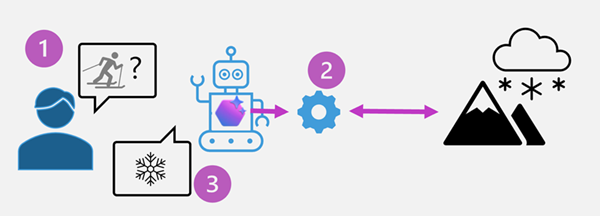
    Adding tools makes custom functionality available for the agent to use, depending on how it decides to respond to the user prompt. For example, consider how a custom tool to retrieve weather data from an external meteorological service could be used by an agent.

    Diagram showing an agent using a custom tool t call an external meteorological service.

    The diagram shows the process of an agent choosing to use the custom tool:

    1. A user asks an agent about the weather conditions in a ski resort.
    2. The agent determines that it has access to a tool that can use an API to get meteorological information, and calls it.
    3. The tool returns the weather report, and the agent informs the user.

    Common scenarios for custom tools in agents

    Custom tools within the Foundry Agent Service enable users to extend the capabilities of AI agents, tailoring them to meet specific business needs. Some example use cases that illustrate the versatility and impact of custom tools include:

    ccnp certification training courses malaysia

  • GitHub Copilot Large Language Models (LLMs)

    GitHub Copilot is powered by Large Language Models (LLMs) to assist you in writing code seamlessly. In this unit, we focus on understanding the integration and impact of LLMs in GitHub Copilot. Let’s review the following topics:

    • What are LLMs?
    • The role of LLMs in GitHub Copilot and prompting
    • Fine-tuning LLMs
    • LoRA fine-tuning

    What are LLMs?

    Large Language Models (LLMs) are artificial intelligence models designed and trained to understand, generate, and manipulate human language. These models are ingrained with the capability to handle a broad range of tasks involving text, thanks to the extensive amount of text data they’re trained on. Here are some core aspects to understand about LLMs:

    Volume of training data

    LLMs are exposed to vast amounts of text from diverse sources. This exposure equips them with a broad understanding of language, context, and intricacies involved in various forms of communication.

    Contextual understanding

    They excel in generating contextually relevant and coherent text. Their ability to understand context allows them to provide meaningful contributions, be it completing sentences, paragraphs, or even generating whole documents that are contextually apt.

    Machine learning and AI integration

    LLMs are grounded in machine learning and artificial intelligence principles. They’re neural networks with millions, or even billions, of parameters that are fine-tuned during the training process to understand and predict text effectively.

    Versatility

    These models aren’t limited to a specific type of text or language. They can be tailored and fine-tuned to perform specialized tasks, making them highly versatile and applicable across various domains and languages.

    ccie certification training courses malaysia

  • GitHub Copilot data

    In this unit, we’ll cover how GitHub Copilot handles data for different environments, features and configurations.

    Data handling for GitHub Copilot code suggestions

    GitHub Copilot in the code editor does not retain any prompts like code or other context used for the purposes of providing suggestions to train the foundational models. It discards the prompts once a suggestion is returned.

    GitHub Copilot Individual subscribers can opt-out of sharing their prompts with GitHub which will otherwise be used to finetune GitHub’s foundational model.

    Data handling for GitHub Copilot chat

    GitHub Copilot Chat operates as an interactive platform, allowing developers to engage in conversational interactions with the AI assistant to receive coding assistance. Here are the steps that it carries out which might be distinct from other features like code completion:

    • Formatting: Copilot meticulously formats the generated response for optimal presentation within the chat interface. It highlights code snippets to improve readability and may include options for direct integration into your code. Copilot showcases the formatted response in the Copilot Chat window within the IDE, allowing you to easily review and interact with the provided information.
    • User engagement: You can actively engage with the response by asking follow-up questions, requesting clarifications, or providing additional input. The chat interface maintains a conversation history to facilitate contextual understanding in subsequent interactions.
    • Data retention: For Copilot Chat used outside the code editor, GitHub typically retains prompts, suggestions, and supporting context for 28 days. Specific retention policies for Copilot Chat within the code editor may vary.

    The same goes for CLI, Mobile, and GitHub Copilot Chat on GitHub.com.

    Prompt types supported by GitHub Copilot Chat

    GitHub Copilot Chat processes a wide range of coding-related prompts, demonstrating its versatility as a conversational coding assistant. Here are some common input types:

    • Direct Questions: You can ask specific questions about coding concepts, libraries, or troubleshooting issues. For example, “How do I implement a quick sort algorithm in Python?” or “Why is my React component not rendering?”
    • Code-Related Requests: You can request code generation, modification, or explanation. Examples include “Write a function to calculate factorial,” “Fix this error in my code,” or “Explain this code snippet.”
    • Open-Ended Queries: You can explore coding concepts or seek general guidance by asking open-ended questions like “What are the best practices for writing clean code?” or “How can I improve the performance of my Python application?”
    • Contextual Prompts: You can provide code snippets or describe specific coding scenarios to seek tailored assistance. For instance, “Here’s a part of my code, can you suggest improvements?” or “I’m building a web application, can you help me with the authentication flow?”
    microsoft 365 certification training courses malaysia
  • Prompt engineering foundations and best practices

    In this unit, we’ll cover:

    • What is prompt engineering?
    • Foundations of prompt engineering
    • Best practices in prompt engineering
    • How Copilot learns from your prompts

    What is prompt engineering?

    Prompt engineering is the process of crafting clear instructions to guide AI systems, like GitHub Copilot, to generate context-appropriate code tailored to your project’s specific needs. This ensures the code is syntactically, functionally, and contextually correct.

    Now that you know what prompt engineering is, let’s learn about some of its principles.

    Principles of prompt engineering

    Before we explore specific strategies, let’s first understand the basic principles of prompt engineering, summed up in the 4 Ss below. These core rules are the basis for creating effective prompts.

    • Single: Always focus your prompt on a single, well-defined task or question. This clarity is crucial for eliciting accurate and useful responses from Copilot.
    • Specific: Ensure that your instructions are explicit and detailed. Specificity leads to more applicable and precise code suggestions.
    • Short: While being specific, keep prompts concise and to the point. This balance ensures clarity without overloading Copilot or complicating the interaction.
    • Surround: Utilize descriptive filenames and keep related files open. This provides Copilot with rich context, leading to more tailored code suggestions.

    These core principles lay the foundation for crafting efficient and effective prompts. Keeping the 4 Ss in mind, let’s dive deeper into advanced best practices that ensure each interaction with GitHub Copilot is optimized.

    Best practices in prompt engineering

    The following advanced practices, based on the 4 Ss, refine and enhance your engagement with Copilot, ensuring that the generated code isn’t only accurate but perfectly aligned with your project’s specific needs and contexts.

    Provide enough clarity

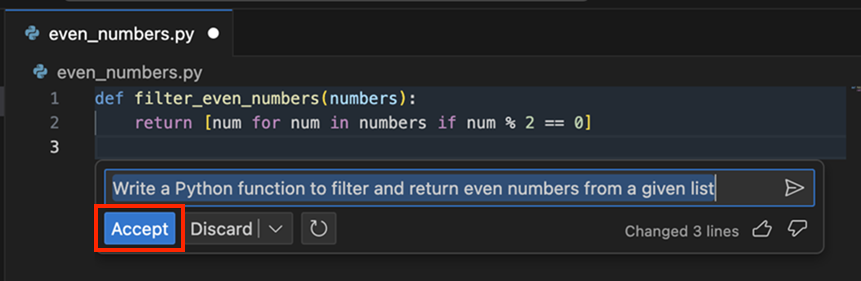
    Building on the ‘Single’ and ‘Specific’ principles, always aim for explicitness in your prompts. For instance, a prompt like “Write a Python function to filter and return even numbers from a given list” is both single-focused and specific.

    Screenshot of a Copilot chat with a Python prompt.

    Provide enough context with details

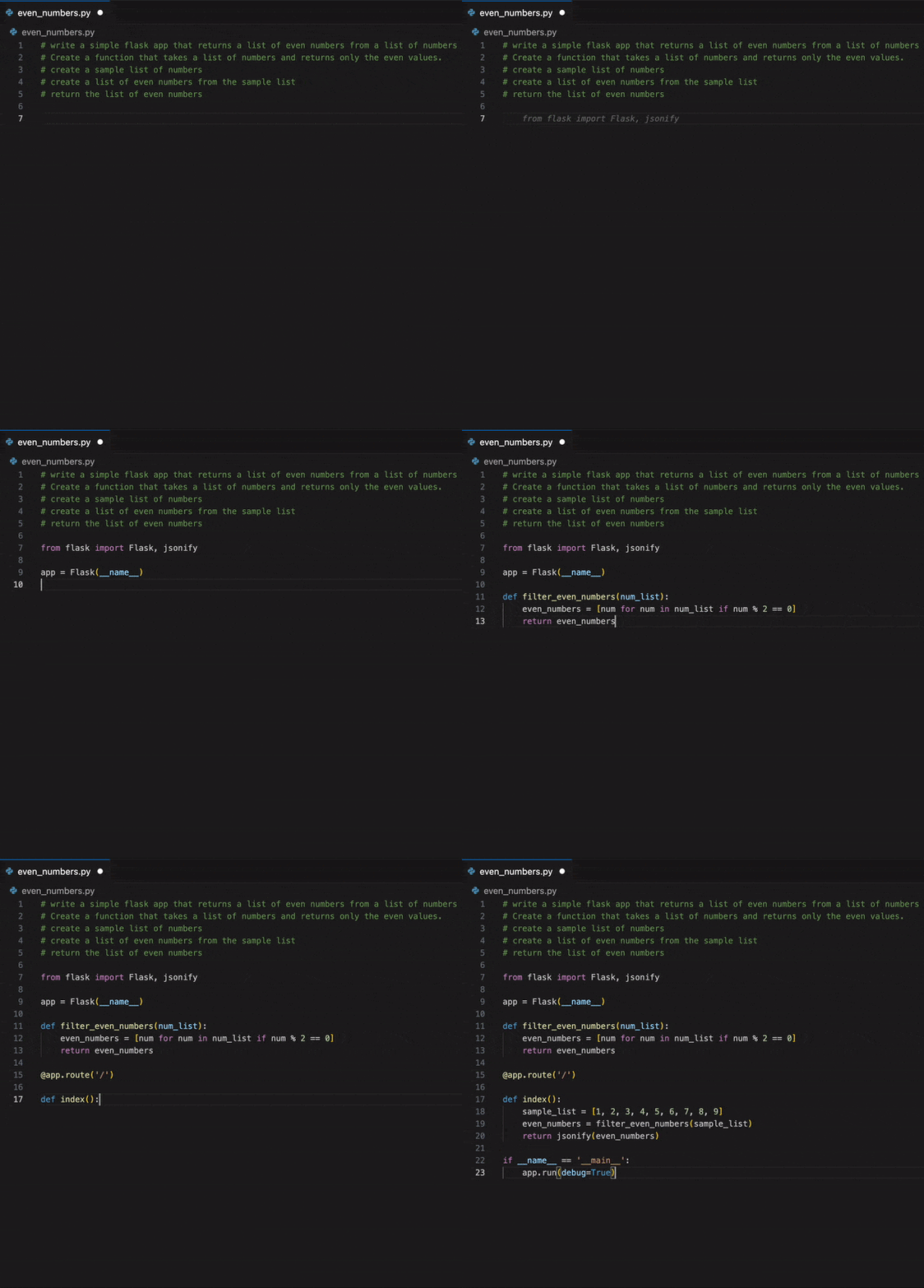
    Enrich Copilot’s understanding with context, following the ‘Surround’ principle. The more contextual information provided, the more fitting the generated code suggestions are. For example, by adding some comments at the top of your code to give more details to what you want, you can give more context to Copilot to understand your prompt, and provide better code suggestions.

    Screenshot of comments added to code for better Copilot suggestions.
    oracle cloud infrastructure training courses malaysia

  • Describe the Microsoft plugins available in Microsoft Security Copilot

    Microsoft Security Copilot integrates with various sources, including Microsoft’s own security products, non-Microsoft vendors, open-source intelligence feeds, websites, and knowledge bases to generate guidance that’s specific to your organization.

    One of the mechanisms by which Copilot integrates to these various sources is through plugins. Plugins extend Copilot’s capabilities. In this unit, you’ll explore the Microsoft plugins.

    Microsoft plugins

    Microsoft plugins give Copilot access to information and capabilities from within your organization’s Microsoft products. The image that follows shows only a subset of the available Microsoft plugins and the order in which the plugins are listed may vary from what is displayed in the product.

    If a Copilot owner has restricted plugin access, then those plugins that have been set to restricted will show greyed out and restricted.

    Screen capture of plugins page, showing Microsoft plugins.

    Generally speaking, Microsoft plugins in Copilot use the OBO (on behalf of) model – meaning that Copilot knows that a customer has licenses to specific products and is automatically signed into those products. Copilot can then access the specific products when the plugin is enabled and, where applicable, parameters are configured. Some Microsoft plugins that require setup, as noted by the settings icon or the setup button, may include configurable parameters that are used for authentication in-lieu of the OBO model.

    To view the system capabilities supported by the enabled plugins, you select the prompt icon located in the prompt bar and select “See all system capabilities.” System capabilities are specific, single prompts that you can use in Copilot. Selecting a system capability typically requires more input to get a useful response, but Copilot provides that guidance.

    Screen capture of the prompt icon that when selected opens the window to select system capabilities.

    The sections that follow provide brief descriptions for many, but not all, of the available Microsoft plugins. Microsoft Security Copilot is continually adding support for Microsoft products.

    Azure Firewall (Preview)

    Azure Firewall is a cloud-native and intelligent network firewall security service that provides best of breed threat protection for your cloud workloads running in Azure. It’s a fully stateful firewall as a service with built-in high availability and unrestricted cloud scalability.

    The Azure Firewall integration with Copilot helps analysts perform detailed investigations of the malicious traffic intercepted by the intrusion detection and prevention system (IDPS) and/or the threat intelligence capabilities of the firewalls across their environment.

    To use the Azure Firewall integration with Copilot:

    • The Azure Firewalls to be used with Security Copilot must be configured with resource specific structured logs for IDPS and these logs must be sent to a Log Analytics workspace.
    • The users using the Azure Firewall plugin in Security Copilot must have the appropriate Azure role-based access control (RBAC) roles to access the Firewall and associated Log Analytics workspace.
    • The Azure Firewall plugin in Security Copilot must be turned on.
    oracle database training courses malaysia