Oracle Database provides generally appropriate values in a sample text initialization parameter file. You can edit these Oracle-supplied initialization parameters and add others, depending upon your configuration and options and how you plan to tune the database.
The text initialization parameter file specifies the values of parameters in name/value pairs.
The text initialization parameter file (PFILE) must contain name/value pairs in one of the following forms:
For parameters that accept only a single value: parameter_name=value
For parameters that accept one or more values (such as the CONTROL_FILES parameter): parameter_name=(value[,value] …)
Parameter values of type string must be enclosed in single quotes (‘). Case (upper or lower) in file names is significant only if case is significant on the host operating system.
For parameters that accept multiple values, to enable you to easily copy and paste name/value pairs from the alert log, you can repeat a parameter on multiple lines, where each line contains a different value.
The index clustering factor measures row order in relation to an indexed value such as employee last name. As the degree of order increases, the clustering factor decreases.
The clustering factor is useful as a rough measure of the number of I/Os required to read an entire table using an index:
If the clustering factor is high, then Oracle Database performs a relatively high number of I/Os during a large index range scan. The index entries point to random table blocks, so the database may have to read and reread the same blocks over and over again to retrieve the data pointed to by the index.
If the clustering factor is low, then Oracle Database performs a relatively low number of I/Os during a large index range scan. The index keys in a range tend to point to the same data block, so the database does not have to read and reread the same blocks over and over.
The clustering factor is relevant for index scans because it can show:
Whether the database will use an index for large range scans
The degree of table organization in relation to the index key
Whether you should consider using an index-organized table, partitioning, or table cluster if rows must be ordered by the index key
Example 3-4 Clustering Factor
Assume that the employees table fits into two data blocks. Table 3-3 depicts the rows in the two data blocks (the ellipses indicate data that is not shown).
Rows are stored in the blocks in order of last name (shown in bold). For example, the bottom row in data block 1 describes Abel, the next row up describes Ande, and so on alphabetically until the top row in block 1 for Steven King. The bottom row in block 2 describes Kochar, the next row up describes Kumar, and so on alphabetically until the last row in the block for Zlotkey.
Assume that a separate index exists on the employee ID column. Conceptually, the index entries might look as follows, with employee IDs distributed in almost random locations throughout the two blocks:
The following statement queries the ALL_INDEXES view for the clustering factor for these two indexes:
CopySQL> SELECT INDEX_NAME, CLUSTERING_FACTOR
  2  FROM ALL_INDEXES
  3  WHERE INDEX_NAME IN ('EMP_NAME_IX','EMP_EMP_ID_PK');

INDEX_NAME           CLUSTERING_FACTOR
-------------------- -----------------
EMP_EMP_ID_PK                       19
EMP_NAME_IX                          2
The clustering factor for EMP_NAME_IX is low, which means that adjacent index entries in a single leaf block tend to point to rows in the same data blocks. The clustering factor for EMP_EMP_ID_PK is high, which means that adjacent index entries in the same leaf block are much less likely to point to rows in the same data blocks.
Skip scanning is beneficial if there are few distinct values in the leading column of a composite index and many distinct values in the nonleading key of the index. The database may choose an index skip scan when the leading column of the composite index is not specified in a query predicate.
Assume that you run the following query for a customer in the sh.customers table:
CopySELECT * FROM sh.customers WHERE cust_email = 'Abbey@company.example.com';
The customers table has a column cust_gender whose values are either M or F. Assume that a composite index exists on the columns (cust_gender, cust_email). The following example shows a portion of the index entries:
The database can use a skip scan of this index even though cust_gender is not specified in the WHERE clause.
In a skip scan, the number of logical subindexes is determined by the number of distinct values in the leading column. In the preceding example, the leading column has two possible values. The database logically splits the index into one subindex with the key F and a second subindex with the key M.
When searching for the record for the customer whose email is Abbey@company.example.com, the database searches the subindex with the value F first and then searches the subindex with the value M. Conceptually, the database processes the query as follows:
CopySELECT * FROM sh.customers WHERE cust_gender = 'F'
  AND cust_email = 'Abbey@company.example.com'
UNION ALL
SELECT * FROM sh.customers WHERE cust_gender = 'M'
  AND cust_email = 'Abbey@company.example.com';
The database performs a unique scan when a predicate references all of the columns in the key of a UNIQUE index using an equality operator. An index unique scan stops processing as soon as it finds the first record because no second record is possible.
An index range scan is an ordered scan of an index in which one or more leading columns of an index are specified in conditions, and 0, 1, or more values are possible for an index key.
The database commonly uses an index range scan to access selective data. The selectivity is the percentage of rows in the table that the query selects, with 0 meaning no rows and 1 meaning all rows. Selectivity is tied to a query predicate, such as WHERE last_name LIKE 'A%', or a combination of predicates. A predicate becomes more selective as the value approaches 0 and less selective (or more unselective) as the value approaches 1.
The database could use a range scan because the last_name column is specified in the predicate and multiples rowids are possible for each index key. For example, two employees are named Austin, so two rowids are associated with the key Austin.
An index range scan can be bounded on both sides, as in a query for departments with IDs between 10 and 40, or bounded on only one side, as in a query for IDs over 40. To scan the index, the database moves backward or forward through the leaf blocks. For example, a scan for IDs between 10 and 40 locates the first index leaf block that contains the lowest key value that is 10 or greater. The scan then proceeds horizontally through the linked list of leaf nodes until it locates a value greater than 40.
A fast full index scan is a full index scan in which the database accesses the data in the index itself without accessing the table, and the database reads the index blocks in no particular order.
A row containing all nulls must not appear in the query result set. For this result to be guaranteed, at least one column in the index must have either:
A NOT NULL constraint
A predicate applied to the column that prevents nulls from being considered in the query result set
Assume that an application issues the following query, which does not include an ORDER BY clause:
CopySELECT last_name, salary
FROM   employees;
The last_name column has a not null constraint. If the last name and salary are a composite key in an index, then a fast full index scan can read the index entries to obtain the requested information:
In an index scan, the database retrieves a row by traversing the index, using the indexed column values specified by the statement. If the database scans the index for a value, then it will find this value in n I/Os where n is the height of the B-tree index. This is the basic principle behind Oracle Database indexes.
If a SQL statement accesses only indexed columns, then the database reads values directly from the index rather than from the table. If the statement accesses nonindexed columns in addition to the indexed columns, then the database uses rowids to find the rows in the table. Typically, the database retrieves table data by alternately reading an index block and then a table block.
Oracle Database SQL Tuning Guide for detailed information about index scans
Full Index Scan
In a full index scan, the database reads the entire index in order. A full index scan is available if a predicate (WHERE clause) in the SQL statement references a column in the index, and in some circumstances when no predicate is specified. A full scan can eliminate sorting because the data is ordered by index key.
Suppose that an application runs the following query:
CopySELECT department_id, last_name, salary
FROM   employees
WHERE  salary > 5000
ORDER BY department_id, last_name;
In this example, the department_id, last_name, and salary are a composite key in an index. Oracle Database performs a full scan of the index, reading it in sorted order (ordered by department ID and last name) and filtering on the salary attribute. In this way, the database scans a set of data smaller than the employees table, which contains more columns than are included in the query, and avoids sorting the data.
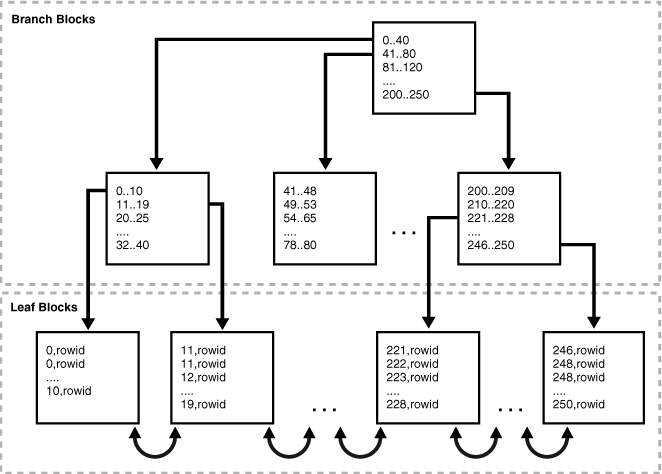
B-trees, short for balanced trees, are the most common type of database index. A B-tree index is an ordered list of values divided into ranges. By associating a key with a row or range of rows, B-trees provide excellent retrieval performance for a wide range of queries, including exact match and range searches.
The following figure illustrates the structure of a B-tree index. The example shows an index on the department_id column, which is a foreign key column in the employees table.
Figure 3-1 Internal Structure of a B-tree Index Description of “Figure 3-1 Internal Structure of a B-tree Index”
This section contains the following topics:
Branch Blocks and Leaf Blocks
Index Scans
Reverse Key Indexes
Ascending and Descending Indexes
Index Compression
Branch Blocks and Leaf Blocks
A B-tree index has two types of blocks: the branch block for searching, and the leaf block for storing key values. The upper-level branch blocks of a B-tree index contain index data that points to lower-level index blocks.
In Figure 3-1, the root branch block has an entry 0-40, which points to the leftmost block in the next branch level. This branch block contains entries such as 0-10 and 11-19. Each of these entries points to a leaf block that contains key values that fall in the range.
A B-tree index is balanced because all leaf blocks automatically stay at the same depth. Thus, retrieval of any record from anywhere in the index takes approximately the same amount of time. The height of the index is the number of blocks required to go from the root block to a leaf block. The branch level is the height minus 1. In Figure 3-1, the index has a height of 3 and a branch level of 2.
Branch blocks store the minimum key prefix needed to make a branching decision between two keys. This technique enables the database to fit as much data as possible on each branch block. The branch blocks contain a pointer to the child block containing the key. The number of keys and pointers is limited by the block size.
The leaf blocks contain every indexed data value and a corresponding rowid used to locate the actual row. Each entry is sorted by (key, rowid). Within a leaf block, a key and rowid is linked to its left and right sibling entries. The leaf blocks themselves are also doubly linked. In Figure 3-1 the leftmost leaf block (0-10) is linked to the second leaf block (11-19).
The database automatically maintains and uses indexes after they are created. Indexes automatically reflect data changes, such as adding, updating, and deleting rows in their underlying tables, with no additional actions required by users.
Retrieval performance of indexed data remains almost constant, even as rows are inserted. However, the presence of many indexes on a table degrades DML performance because the database must also update the indexes.
Oracle Database stores index data in an index segment.
Space available for index data in a data block is the data block size minus block overhead, entry overhead, rowid, and one length byte for each value indexed.
The tablespace of an index segment is either the default tablespace of the owner or a tablespace specifically named in the CREATE INDEX statement. For ease of administration you can store an index in a separate tablespace from its table. For example, you may choose not to back up tablespaces containing only indexes, which can be rebuilt, and so decrease the time and storage required for backups.
B-tree indexes are the standard index type. They are excellent for highly selective indexes (few rows correspond to each index entry) and primary key indexes. Used as concatenated indexes, a B-tree index can retrieve data sorted by the indexed columns. B-tree indexes have the subtypes shown in the following table.
An index-organized table differs from a heap-organized because the data is itself the index.
“Overview of Index-Organized Tables”
Reverse key indexes
In this type of index, the bytes of the index key are reversed, for example, 103 is stored as 301. The reversal of bytes spreads out inserts into the index over many blocks.
“Reverse Key Indexes”
Descending indexes
This type of index stores data on a particular column or columns in descending order.
“Ascending and Descending Indexes”
B-tree cluster indexes
This type of index stores data on a particular column or columns in descending order.
“Ascending and Descending Indexes”
The following table shows types of indexes that do not use a B-tree structure.
In a bitmap index, an index entry uses a bitmap to point to multiple rows. In contrast, a B-tree index entry points to a single row. A bitmap join index is a bitmap index for the join of two or more tables.
“Overview of Bitmap Indexes”
Function-based indexes
This type of index includes columns that are either transformed by a function, such as the UPPER function, or included in an expression. B-tree or bitmap indexes can be function-based.
“Overview of Function-Based Indexes”
Application domain indexes
A user creates this type of index for data in an application-specific domain. The physical index need not use a traditional index structure and can be stored either in the Oracle database as tables or externally as a file.